Case Study
Design Engineer IDE
dide, the Design Engineer IDE, is a project workspace for designers who build: the people who ship interface code, review pull requests, follow tickets across teams, and run several AI coding agents at once. Instead of another dashboard, dide keeps a local record of everything that happens across Linear, GitHub and a markdown knowledge base, joins it into one thread per piece of work, and lets you act on it from the same screen. It answers the questions that cost the most time: what changed since I last looked, what is waiting on me, what is quietly stalling, and what did the agents do while I was in a meeting. All of it runs and stays on the user's own machine.
- work sources in one record
- 3
- AI coding agents metered
- 3
- minimum text contrast
- 7:1
- automated tests
- 680+
The Challenge
A design engineer is the maker, the reviewer and the orchestrator at once. In a single morning they ship interface code, review pull requests, follow tickets across several teams, keep notes in a knowledge base and run three or four AI coding sessions whose output no other tool shows. Answering "what needs me right now?" meant opening four apps and rebuilding the picture by hand. Dashboards that tried to help failed because you could look but not act, and team tools failed by fighting the systems teams already use.
Our Approach
We treated work as a stream to replay, not a pile to sort. dide works like a flight recorder: one append-only event log on the user's machine takes in every change from Linear, GitHub and the knowledge base, and every screen is a query over that log. A ticket, its pull requests and the notes that mention it join into one thread through links that already exist, such as a ticket ID in a branch name or a URL in a note. Fuzzy matches are only ever suggested and never joined on their own, because a wrong join destroys trust faster than a missing one. dide also remembers when your own eyes last touched each item, so every screen can show what changed since you last looked.
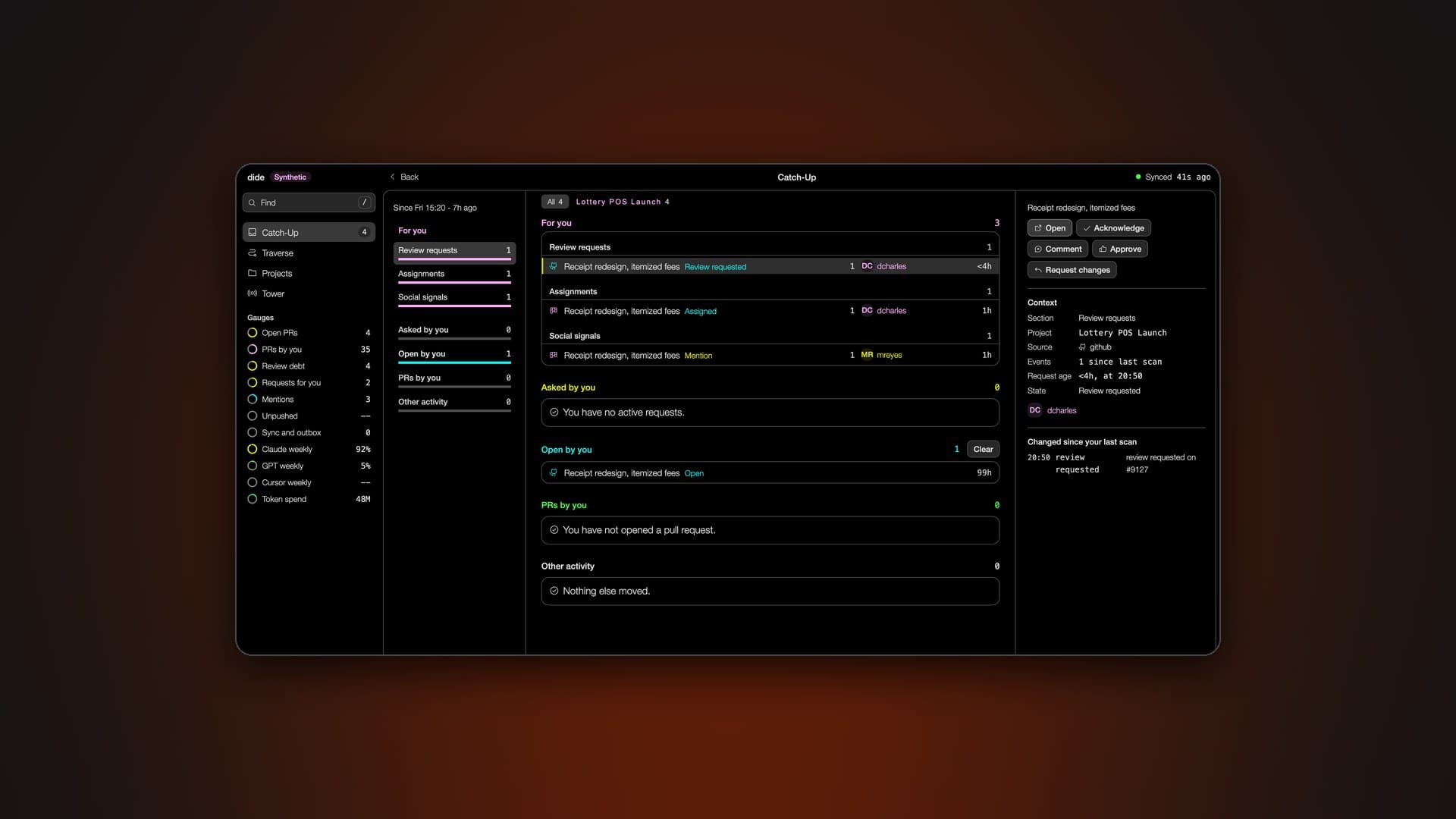
Catch-Up
Catch-Up is the first screen after any time away, and it is titled with the gap it covers, such as "Since Fri 15:20, 7h ago". It separates direct requests, like review requests and assignments, from social signals like mentions, then lists the requests you made of others and the pull requests you have open. Each row shows who is waiting and for how long. A detail pane shows what changed since your last scan, and acknowledging an item moves your read point forward, so the list shrinks as you work through it. Nothing is ever labeled as blocked unless a source can prove the dependency.
The Traverse
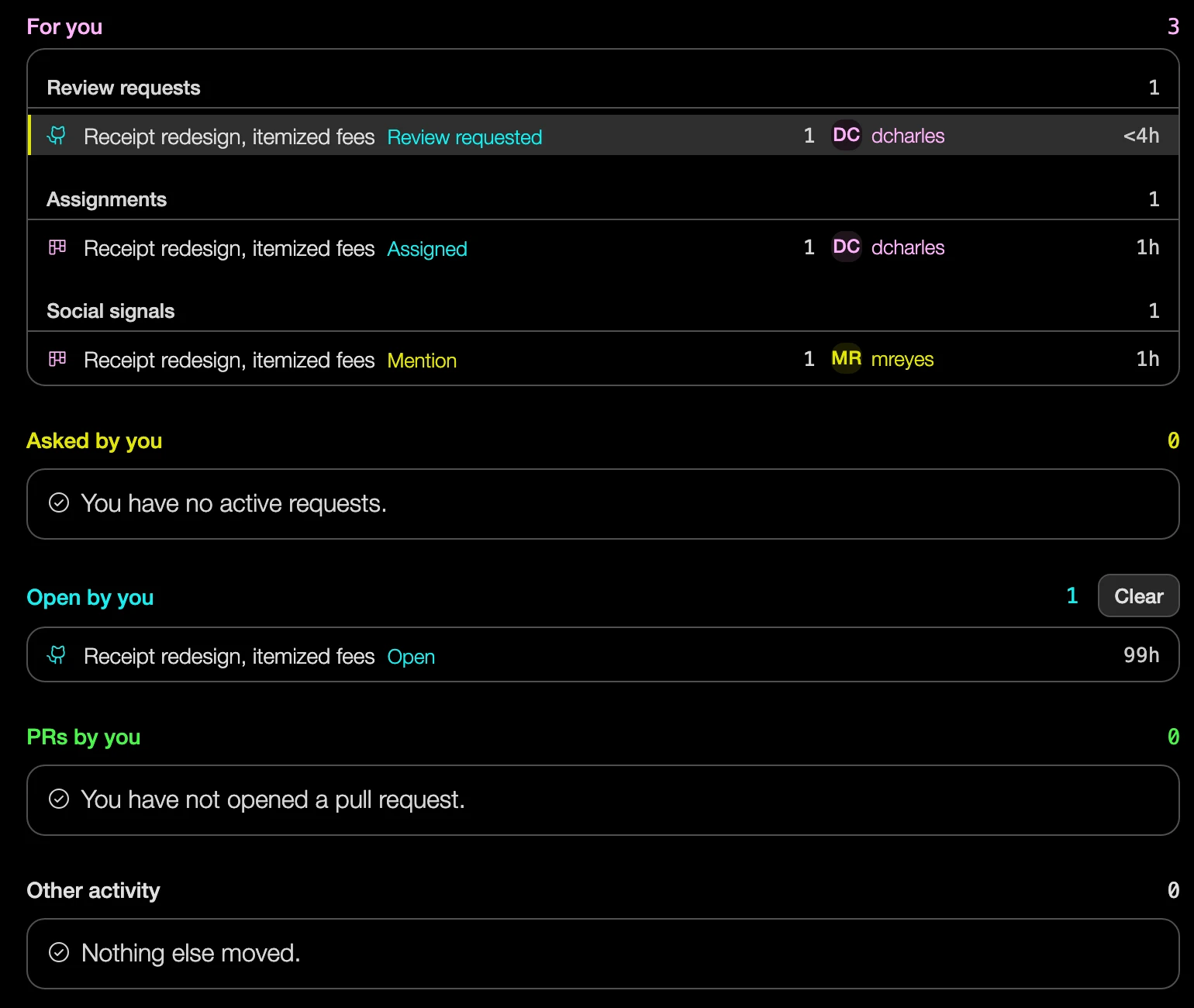
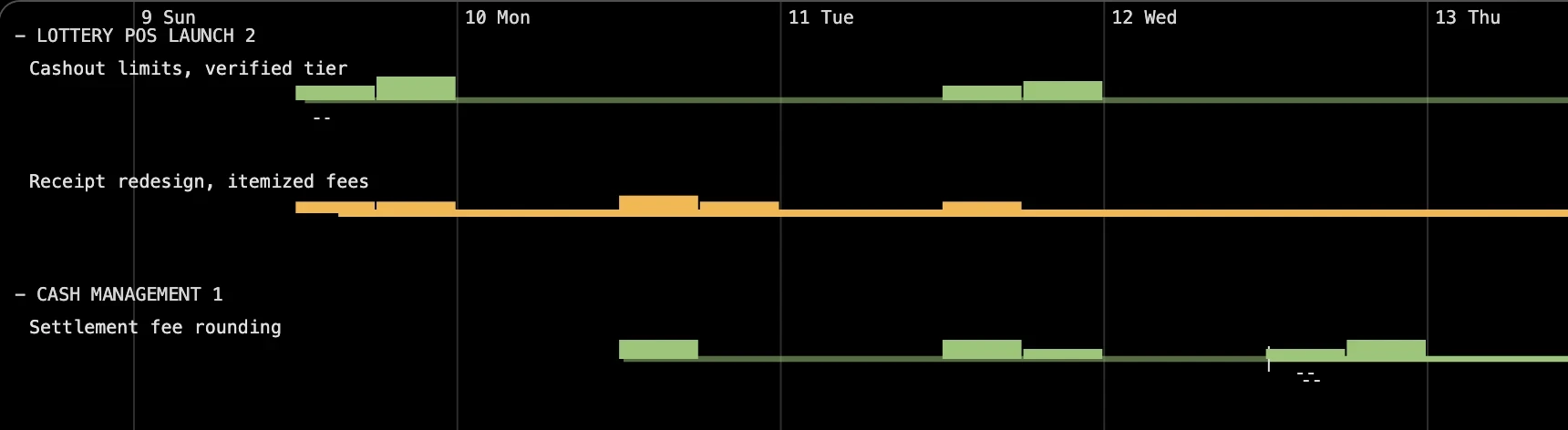
The Traverse draws work as time. Each thread is a line running left to right, grouped by project, with a live marker for now. Busy stretches grow thicker and warmer, so a thread that has gone flat and cool is a stall you can spot without reading a word. A mark on every line shows where you last looked, and knowledge base entries settle along the bottom as a band of sediment beneath the faster work above. For first-day users and portfolio viewers, a designed synthetic week fills the view, and it is labeled on screen as synthetic data.
Writing Back Safely
dide acts as well as reports. From the same screen you can comment on a Linear ticket, change its state, or approve a GitHub pull request or request changes on it. Every write is optimistic, goes through a visible outbox, and is never allowed to fail in silence. While building it, we found and fixed the cases that quietly break trust: a retry that could post a comment twice while the first request was still in flight, a failure that left a row looking pending, and a comment that reached Linear but was shown as failed. Each fix was proven against a real ticket.
Watching the Agents
The sidebar carries gauges for the work, from review debt to unpushed code, and for the AI agents behind it. Token spend adds up the last 30 days of Claude Code, Codex and Cursor usage from each agent's own records. Weekly allowance gauges show a percentage only when the provider publishes one, and they drop a reading once its cycle resets, because a bar measured against a guessed limit is worse than one that admits it does not know. A Projects view scans the local code folder and flags work at risk, such as uncommitted changes, unpushed commits or a repo with no remote, ordered by how much work is at stake.
Room for AI, with Rules
dide uses a model only where code cannot do the job, such as reading long comment threads or turning a sentence into a query. The model layer was built and tested before the first feature, under rules set in advance. Every generated sentence must cite the events it came from, or it is dropped. Attention data such as your read history never leaves the machine, and a test enforces that. Every call is logged with its cost, and dide counts its own usage on the same gauge as the agents it meters. One switch turns AI off, and every screen is complete without it.
Built to a Standard
Every color in dide is generated in the LCH color space to meet its contrast floor, 7:1 for text and 3:1 for other marks, and tests check it on every surface. The type scale, weights, corner radii, icons and line lengths are enforced by tests in the same way, so a stray font size or a hand-drawn icon fails the build. dide never shows a pop-up, badge or toast you did not ask for. Each view ships with designed empty, loading, error and offline states, and being offline is treated as normal rather than as an error.
Technology & Deployment
dide is a macOS desktop app built with Tauri 2, with a Rust backend and a React and TypeScript front end. All data lives in one local SQLite file with full-text search. Each source has its own ingest lane, with no sync server in between, and GitHub access reuses the developer's existing GitHub CLI login, so no new token is stored. A command-line companion, didectl, can drive every backend path without opening the window, and more than 680 automated tests cover the front end and the backend.